Automated optical inspection (AOI) depends on more than cameras and image-processing software. A controller must collect image data, run inspection algorithms, communicate with production equipment, and operate reliably across shifts. Choosing between a traditional vision controller and an Edge AI Box PC affects performance, integration effort, upgrade flexibility, and long-term operating cost.
Start With the Inspection Workload
A traditional vision controller can suit a stable task with known product geometry, controlled lighting, and a limited set of rules. It is often effective for thresholding, pattern matching, and conventional image processing. When products and inspection criteria rarely change, a dedicated controller may offer a straightforward setup.
Modern lines, however, may need to inspect more product variants, detect subtle defects, or combine several camera views. These workloads can require larger image sets and AI inference. Teams should assess current throughput and likely future complexity rather than selecting hardware only for today’s task.
When an Edge AI Box PC Makes Sense
An edge AI box PC can combine image processing, AI inference, equipment communication, and local decision-making in one industrial computer. Processing images near the line reduces the need to send every frame to a remote server. It can also support fast responses when an inspection result must trigger a reject mechanism, notify a PLC, or stop a process.
This approach is useful when a station handles multiple cameras, high-resolution images, or models that may change over time. The value comes not from AI alone, but from matching computer, networking, expansion, and industrial interfaces to the production line.
Compare Compute Capacity and Expansion
Traditional controllers may be optimized for a narrow, established pipeline. That can reduce complexity, but may restrict upgrades when teams add cameras, adopt new models, or require more processing capacity. An expandable PC gives designers more options, provided they size the configuration for the workload.
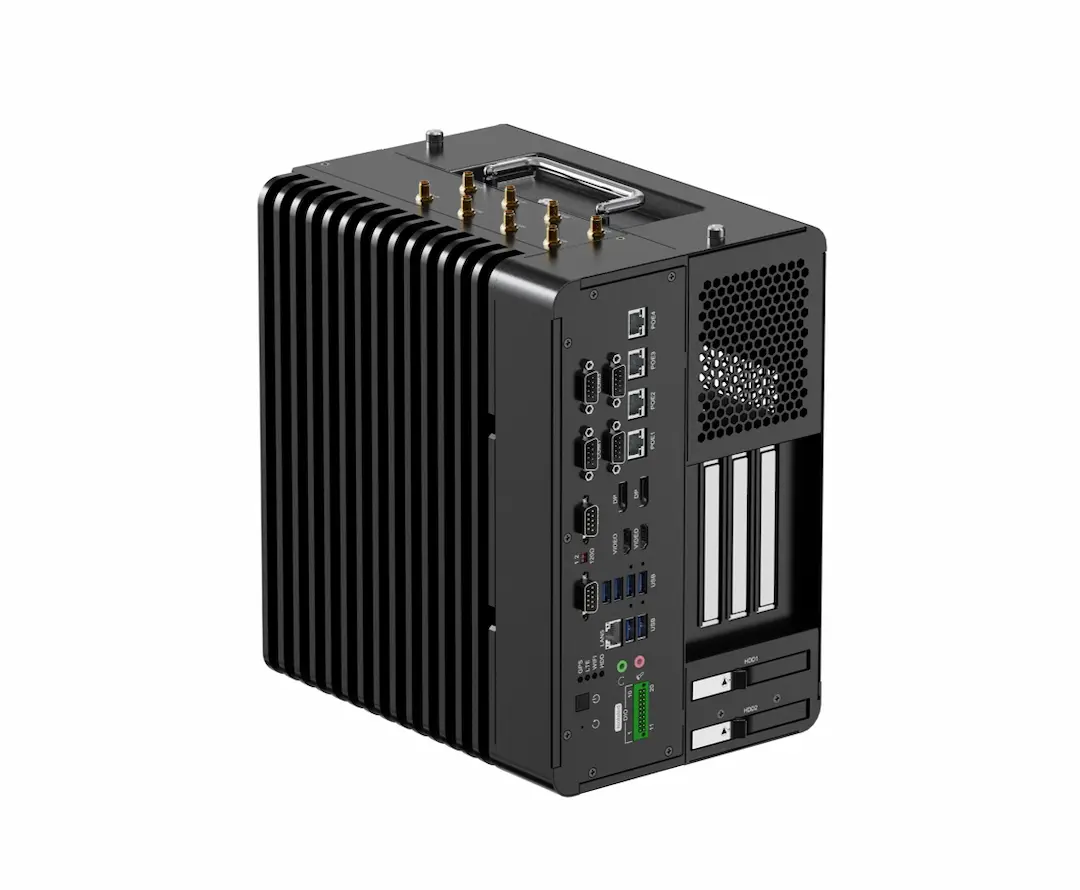
The EPC-R680E supports 12th, 13th, or 14th Gen Intel Core desktop processors and mainstream GPUs through a PCIe 5.0 x16 slot. Two DDR5 SO-DIMM sockets support up to 96 GB of memory. This flexibility can support AI inference and image handling, but actual performance depends on CPU, GPU, model, cameras, and software. Benchmark the complete workflow instead of comparing processor names alone.
Check Camera Connectivity and Industrial I/O
Integration can slow down when interfaces do not match cameras, lighting controllers, PLCs, motion systems, or factory networks. Before selecting a controller, map required data rates, port counts, triggering, isolation, and cable distances. Confirm driver and SDK compatibility as well.
The EPC-R680E provides one 1GbE port and four 2.5GbE ports with PoE+ support for compatible cameras. It also offers USB 3.2, isolated RS232/485/422 serial interfaces, isolated CAN, and digital inputs and outputs. These connections give integrators options for linking inspection hardware with production equipment. Confirm compatibility with the exact camera, PLC, and application stack. This is especially important when specifying an automated optical inspection machine, where missed interfaces can add adapters, wiring, and commissioning work.
Consider Environmental Reliability
Production-floor controllers may face temperature changes, vibration, electrical noise, and limited-service access. A standard office PC may need extra protection and validation. Evaluate the actual installation, including cabinet airflow, mounting, power stability, and maintenance access.
The finless EPC-R680E has an IP50-rated enclosure and accepts 9V–60V DC input. Its listed operating range is -40°C to 70°C for 35W TDP CPUs, with a lower upper limit for 65W TDP CPUs. Configuration therefore matters. These specifications help narrow options, but testing in the target cabinet or inspection station remains essential.
Balance Local Processing With Plant Data
Local processing does not mean an inspection station should be isolated. AOI systems may need to send defect counts, selected images, alarms, and production metrics to a manufacturing execution system or quality database. Decide which tasks must remain local for low latency and which information should be shared for traceability.
A station can classify images locally and send results to a PLC, while uploading selected defect images and summary data. This limits unnecessary traffic while preserving evidence for quality analysis. Security, timestamp consistency, buffering during outages, and remote update procedures should be considered at design stage.
Evaluate Lifecycle Cost, Not Only Purchase Price
A traditional controller may cost less initially for a fixed, simple task. An edge PC may require a higher investment, particularly with a discrete GPU or extra storage. However, total cost also includes engineering time, integration, downtime, model updates, spare parts, and later expansion.
OEMs and integrators should ask about product availability, operating-system support, drivers, documentation, remote diagnostics, and update validation. The EPC-R680E lists Windows 10/11 IoT support and Linux support upon request. It also includes management features such as iAMT, Wake-on-LAN, and PXE boot. Verify availability and support terms for the exact configuration. Vantron’s product portfolio should be evaluated against the project’s required life and procurement plan, not just the initial bill of materials.
Match the Controller to the AOI Roadmap
A traditional vision controller remains reasonable for a stable, narrowly defined inspection task. An expandable edge platform deserves consideration when a project needs multi-camera connectivity, AI-based defect recognition, stronger local computing, or room for future changes. Compare options using production samples, end-to-end latency, detection quality, interfaces, and maintainability.
The EPC-R680E is one option for teams that need configurable compute and industrial connectivity in an inspection station. Validate the full software stack and run trials under real line conditions before approving a design. Working with Vantron can support the evaluation, but the final choice should follow measurable inspection requirements, integration fit, and lifecycle cost.